Block Agent Context Variables
This guide describes how to implement variables within your Block Agent. Learn more about:
Overview
Context variables enable agents to remember what happened, adapt to what they know, and make intelligent decisions based on accumulated information.
These variables are key-value pairs that represent the current state and accumulated knowledge of a conversation session. They form the backbone of intelligent conversation flow, serving as accessible information sources that enable:
-
Adaptive Content: Dynamic prompts that change based on conversation state
-
Session Memory: Persistent information across conversation Turns
-
Personalization: User-specific and interaction-specific customization
Think of context variables as the agent's working memory—constantly updated, always available, and essential for coherent multi-turn conversations.
Types of Context Variables
Context variables are broadly categorized into two types based on their life-cycle:
-
Transient Variables
-
Transient variables are short-lived—they exist only for the duration of a single Turn. When the next Turn begins, they're gone unless explicitly passed again.
-
Sources of Transient Variables:
-
Flow arguments (flow_args) passed in the API request.
-
Top-level fields in the user_message for wait Turns
-
-
-
Persistent Variables
-
Persistent variables accumulate over the course of the conversation and remain available across all Turns in the session.
-
Sources of Persistent Variables:
-
Tool call outputs (all parameters captured by tools)
-
Policy object passed in API requests
-
The special data.* field in wait Turn responses
-
-
Flow Arguments
Flow arguments ("flow_args") are variables that are passed to the agent at run-time.
These variables provide contextual information for the current interaction only. As transient variables, the data changes every Turn.
Popular arguments include:
-
arg_context_date_time to specify the current date and time for scheduling appoints (i.e., "Friday 2025-11-07 10:00 AM").
-
arg_context to include knowledge base content with responding to callers (i.e., "Office Hours: Mon-Fri 8am-5pm...").
-
arg_ani_match to include caller lookup results from a CRM (i.e., { "patient_id": "P123", ... }).
Passing Flow Arguments via API Request
{
	"user_message": "hi",
	"flow_args": {
		"arg_brand_name": "Dr. Teeth Main Street",
		"arg_office_address": "2001 W Alameda, Denver, CO, 80223",
		"arg_context_date": "2025-01-15",
		"arg_context_time": "10:30 AM",
		"arg_current_day_of_week": "Wednesday",
		"arg_ANI": "123-456-7891",
		"arg_ani_match": {
			"patient_id": "P12345",
			"first_name": "John",
			"date_of_birth": "1985-06-15"
		},
		"arg_existing_appointments": {
			"matches": [
				{"date": "2025-01-20T14:00:00", "type": "cleaning"}
			]
		}
	}
}
Flow Arguments in Turns
Once passed, flow arguments become available as Jinja2 variables in your Turn content:
- turn_id: '000005'
	name: greeting_intent
	content: |-
		{% if arg_ani_match is defined and arg_ani_match %}
			{% if arg_existing_appointments.matches|length > 1 %}
			Rephrase: This is Sofia! Welcome back! I see you have
			{{arg_existing_appointments.matches|length}} upcoming appointments.
			Are you calling about one of those today?
			{% else %}
			Rephrase: This is Sofia! Welcome back! I see you have an upcoming appointment. Are you calling about that today?
			{% endif %}
		{% else %}
		Rephrase: This is Sofia! Most of our patients use this line to quickly confirm or change appointments. What do you need today?
		{% endif %}
In this example:
-
arg_ani_match is checked to see if the caller was recognized
-
arg_existing_appointments.matches provides the list of upcoming appointments
-
The greeting adapts based on what we know about this caller
Flow Arguments Across Turns
The sample below demonstrates the transient nature of Flow Arguments.
Turn 1 Request:
{
	"flow_args": {
		"arg_context_date": "2025-01-15",
		"arg_special_offer": "New Year 20% discount"
	}
}
→ Turn 1 can access: arg_context_date, arg_special_offer ✓

Turn 2 Request:
{
	"flow_args": {
		"arg_context_date": "2025-01-15"
		// arg_special_offer NOT passed
	}
}
→ Turn 2 can access: arg_context_date ✓
→ Turn 2 CANNOT access: arg_special_offer ✗ (gone!)
If you need data to persist, you can either:
-
Pass it again in every request
-
Store it in your Policy instead
-
Capture it via Tool calls
For more information about using Block Agent flow arguments with API interactions check out this page.
For more information about using flow arguments on the AI Studio Block Agent Canvas, check out this page.
Wait Turn Responses
When a wait Turn receives a response from an external system, the user_message carries structured data that becomes available as context variables.
Sample Basic Wait Turn Response
{
	"user_message": {
		"success": true,
		"date_of_birth_lookup": "schedule_appointment",
		"patient_id": "P12345"
	}
}
In this example:
-
success, date_of_birth_lookup, and patient_id all become transient context variables
-
They're available for Edge evaluation and the immediate next Turn
-
They won't persist to subsequent Turns
The data.* Field
The data field is special—anything nested within it becomes persistent and accessible across all subsequent Turns.
The data.* pattern solves a common challenge: after a wait Turn returns availability data, subsequent Turns (like appointment selection, confirmation, and booking) all need access to that same data. Without persistence, you'd have to pass the entire appointment list in every flow_args, which would be cumbersome and error-prone.
Sample Data Configuration
{
	"user_message": {
		"success": true,
		"availability_lookup": true,
		"data": {
			"available_appointments": {
				"matches": [
					{
						"appointment_date": "2025-01-15T09:00:00",
						"duration": 60,
						"provider_id": "P001"
					},
					{
						"appointment_date": "2025-01-16T14:00:00",
						"duration": 60,
						"provider_id": "P002"
					}
				]
			},
			"availability_for_date": "2025-01-15",
			"patient_name": "John Smith"
		}
	}
}
Some of the fields are transient (current Turn only) and some of the fields are persistent (all subsequent Turns):
| Transient Data | Persistent Data |
|---|---|
| success | data.available_appointments |
| availability_lookup | data.availability_for_date |
| data.patient_name |
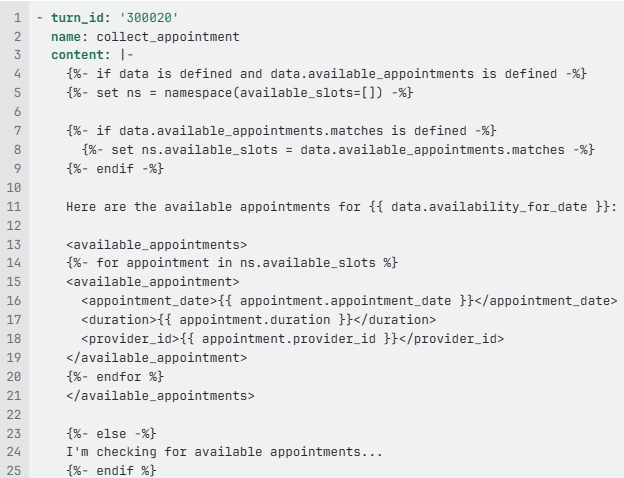
Accessing Persistent Data in Turns
In subsequent Turns, access persistent data using the data. prefix.
Sample Configuration
Tool Outputs
Every time a Tool is called, its captured parameters become persistent context variables. This is one of the most powerful aspects of Block Agents, data collection naturally builds up your conversation context.
Sample Tool Definition
- type: function
  function:
	name: collect_date_of_birth
	description: 'Collect the full date of birth including year, month, and day.'
	parameters:
		type: object
		properties:
			birth_year:
				type: string
				description: The year of birth in numeric YYYY format.
			birth_month:
				type: string
				description: The month of birth in numeric MM format.
			birth_day:
				type: string
				description: The day of birth in numeric DD format.
			date_of_birth:
				type: string
				description: Complete date of birth in ISO format YYYY-MM-DD.
		required:
			- date_of_birth
Tool Execution Result
When the LLM calls this Tool with the user's response "June fifteenth nineteen eighty five", the following values are captured:
{
	"collect_date_of_birth": true,
	"birth_year": "1985",
	"birth_month": "06",
	"birth_day": "15",
	"date_of_birth": "1985-06-15"
}
All of these become persistent context variables:
-
birth_year → "1985"
-
birth_month → "06"
-
birth_day → "15"
-
date_of_birth → "1985-06-15"
Accessing Tool Outputs in Later Turns
In any subsequent Turn, you can reference these captured values:
- turn_id: '900012'
  name: confirmation
  content: |-
	{% if date_of_birth is defined %}
	I have verified your date of birth as {{ date_of_birth }}.
	{% endif %}

	{% if appointment_name is defined and appointment_date_time is defined %}
	Your {{ appointment_name }} appointment is scheduled for
	{{ appointment_date_time }}.
	{% endif %}
Accumulation Over Time
Tool outputs accumulate throughout the conversation:
After Turn 1 (Greeting):
	- schedule_appointment: true
	- intent_utterance: "I need to schedule a cleaning"
	- language_name: "English"

After Turn 2 (New/Existing):
	- schedule_appointment: true
	- intent_utterance: "I need to schedule a cleaning"
	- language_name: "English"
	- patient_status: "returning_patient"  ← NEW

After Turn 3 (DOB Collection):
	- schedule_appointment: true
	- intent_utterance: "I need to schedule a cleaning"
	- language_name: "English"
	- patient_status: "returning_patient"
	- birth_year: "1985"  ← NEW
	- birth_month: "06"  ← NEW
	- birth_day: "15"  ← NEW
	- date_of_birth: "1985-06-15"  ← NEW

After Turn 4 (Appointment Type):
	- (all previous values)
	- appointment_name: "cleaning"  ← NEW
	- appointment_type_id: "APT001"  ← NEW
This accumulation enables rich contextual awareness as the conversation progresses.
Policies
Policy values are persistent by design. They are passed once (typically at the start of the conversation) and available throughout the entire session.
Sample Policy
{
	"user_message": "hello",
	"policy": {
		"office_name": "Dr.Teeth Main Street",
		"office_id": "LOC001",
		"transfer_number": "+11234567892",
		"enable_spanish": true,
		"business_hours": {
			"monday": "8:00 AM - 7:00 PM",
			"tuesday": "8:00 AM - 7:00 PM",
			"wednesday": "8:00 AM - 7:00 PM",
			"thursday": "8:00 AM - 7:00 PM",
			"friday": "8:00 AM - 5:00 PM"
		},
		"allowed_appointment_types": ["cleaning", "consultation", "emergency"]
	}
}
Accessing Your Policy in Turns
Policy values are accessed via the policy. prefix:
content: |-
	{% if policy.enable_spanish %}
	(Spanish support is available for this call)
	{% endif %}

	Welcome to {{ policy.office_name }}!

	Our business hours are:
	{% for day, hours in policy.business_hours.items() %}
	- {{ day|title }}: {{ hours }}
	{% endfor %}

	{% if policy.allowed_appointment_types %}
	I can help you schedule: {{ policy.allowed_appointment_types|join(', ') }}.
	{% endif %}
Policies vs. Flow Arguments
The table below guides when to use which context variable type, depending on your scenario:
| Scenario | Use Policy | Use Flow Arguments |
|---|---|---|
| Office configuration | X | |
| Transfer phone numbers | X | |
| Feature flags | X | |
| Current date/time | X | |
| Caller lookup results | X | |
| Real-time availability | X | |
| Dynamic pricing | X |
Jinja Templates
Jinja is a powerful templating language that allows you to create dynamic content by embedding logic and variables directly into your Block Agent. Instead of writing static, one-size-fits-all configurations, you can create intelligent, context-aware instructions that adapt based on run-time data.
The true power of context variables emerges when combined with Jinja2 templating. This combination enables sophisticated, dynamic content generation that adapts to the full conversation state.
Conditional Content Based on Context
Adapt behavior based on what you know about the caller:
content: |-
	{% if arg_ani_match is defined and arg_ani_match %}
		{# Recognized caller - personalized greeting #}
		{% if arg_existing_appointments is defined and
				arg_existing_appointments.matches|length > 0 %}
			Welcome back, {{ arg_ani_match.first_name }}! I see you have
			{{ arg_existing_appointments.matches|length }} upcoming appointment{% if arg_existing_appointments.matches|length > 1 %}s{% endif %}.
			Are you calling about one of those?
		{% else %}
			Welcome back, {{ arg_ani_match.first_name }}! How can I help you today?
		{% endif %}
		{% else %}
			{# Unknown caller - generic greeting #}
			This is Sofia! How can I help you today?
		{% endif %}
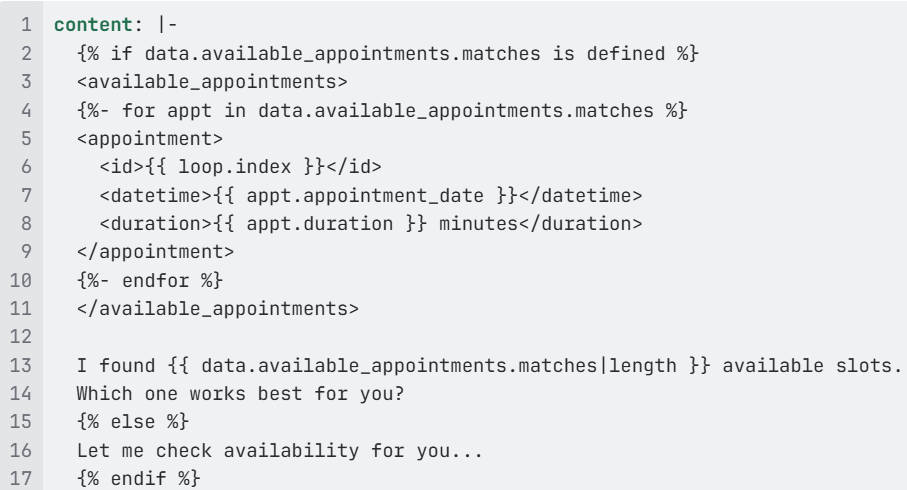
Iterating Over Collected Data
Present options based on available data:
Building on Previous Tool Outputs
Reference accumulated data from earlier Turns:
content: |-
	{# These are all persistent from previous tool calls #}
	{% if schedule_appointment is defined and schedule_appointment %}
		{% if date_of_birth is defined %}
		I've verified your identity using your date of birth.
		{% endif %}

		{% if appointment_name is defined %}
		You're scheduling a {{ appointment_name }} appointment.
		{% endif %}

		{% if appointment_date_time is defined %}
		The selected time is {{ appointment_date_time }}.
		{% endif %}

		Let me confirm the booking...
	{% endif %}
Validation and Error Handling
Check for required data before proceeding:
content: |-
	{# Validate we have everything needed #}
	{% set missing_fields = [] %}

	{% if not first_name or not first_name %}
		{% set _ = missing_fields.append("first name") %}
	{% endif %}

	{% if not last_name or not last_name %}
		{% set _ = missing_fields.append("last name") %}
	{% endif %}

	{% if not date_of_birth or not date_of_birth %}
		{% set _ = missing_fields.append("date of birth") %}
	{% endif %}

	{% if missing_fields|length > 0 %}
	I still need to collect: {{ missing_fields|join(', ') }}.
	{% else %}
	Great! I have all the information I need. Let me proceed.
	{% endif %}
Conditional Edge Logic with Context
Use context variables in transition_prompt for dynamic Edge behavior:
- edge_id: '1'
  name: schedule_appointment_start
  type: edge
  condition:
	source: tools
	expected_value:
		schedule_appointment: true
		arg_is_existing_patient: true
  transition_prompt: |-
	{%- if arg_is_existing_patient is defined and arg_is_existing_patient -%}
	Use this when the user wants to schedule an appointment.
	{%- else -%}
	NO TRANSITION
	{%- endif -%}
  connect_to:
	turn_id: '100005'
Complex Data Calculations
Leverage context for date-based logic:
content: |-
	{# Parse the context date #}
	{%- set date_parts = arg_context_date.split('-') -%}
	{%- set year = date_parts[0]|int -%}
	{%- set month = date_parts[1]|int -%}
	{%- set day = date_parts[2]|int -%}

	{# Calculate next business day #}
	{%- set weekday = (day + ((13 * (month + 1)) // 5) + year + (year // 4) + 5) % 7 -%}

	{% if weekday == 5 %}
		{# Saturday - next available is Monday #}
		The soonest I can book is Monday.
	{% elif weekday == 6 %}
		{# Sunday - next available is Monday #}
		The soonest I can book is Monday.
	{% else %}
		I can check availability starting tomorrow.
	{% endif %}

	Today's date is {{ arg_context_date }}.
Frequently Used Jinja Filters for Context Variables
When working with context variables, these Jinja filters (using pipe operators | ) are particularly useful:
|
Filter |
Purpose |
Example |
|---|---|---|
|
default(value) |
Provide fallback |
{{ name\\|default('Guest') }} |
|
length |
Count items |
{{ appointments\\|length }} |
|
join(sep) |
Combine list items |
{{ types\\|join(', ') }} |
|
first or last |
Get first/last item |
{{ dates\\|first }} |
|
upper or lower |
Case conversion |
{{ status\\|upper }} |
|
title |
Title case |
{{ name\\|title }} |
|
round(n) |
Round numbers |
{{ price\\|round(2) }} |
|
int or string |
Type conversion |
{{ count\\|int }} |
Sample with Filters
content: |-
	{# Safely access with defaults #}
	Hello {{ first_name|default('valued patient')|title }}!

	{% if data.available_appointments.matches is defined %}
		{% set appts = data.available_appointments.matches %}
		I found {{ appts|length }} appointment{{ 's' if appts|length > 1 else '' }}.

		The earliest is {{ appts|first|attr('appointment_date') }}.
		The latest is {{ appts|last|attr('appointment_date') }}.
	{% endif %}
For more information about Jinja variables, check out the basics here and more in depth information here.
Tips
-
Always check for undefined variables before accessing.
{# Good - defensive checking #} {% if arg_ani_match is defined and arg_ani_match.first_name is defined %} Hello {{ arg_ani_match.first_name }}! {% endif %} {# Or use defaults #} Hello {{ arg_ani_match.first_name|default('there') }}! -
Use clear meaningful variable names.
{# Good - clear naming #} {% if patient_has_verified_identity %} {% if appointment_requires_deposit %} {# Avoid - unclear #} {% if flag1 %} {% if status == 1 %} -
Separate logic from presentation.
{# Good - calculate first, then present #} {% set has_appointments = data.appointments is defined and data.appointments|length > 0 %} {% set appointment_count = data.appointments|length if has_appointments else 0 %} {% if has_appointments %} You have {{ appointment_count }} upcoming appointments. {% else %} You don't have any upcoming appointments. {% endif %} -
Handle missing data gracefully.
content: |- {% if data is not defined or data.available_appointments is not defined %} I'm still loading the available appointments... {% elif data.available_appointments.matches|length == 0 %} I couldn't find any available appointments for that date. {% else %} Here are your options: {# ... present appointments ... #} {% endif %} -
Use Jinja filters for safe, clean data transformations.
-
Remember when to use each context variable type:
-
Use flow_args for data that changes every Turn
-
Use policy for configuration that persists
-
Use data.* in wait responses for persistent external data
-
Tool outputs naturally accumulate. Design Tools to capture what you'll need later.
-