How to Integrate Jinja Templates
This guide describes how to implement Jinja templating within your Block Agent. Learn more about:
Overview
Jinja is a powerful templating language that allows you to create dynamic content by embedding logic and variables directly into your Block Agent. Instead of writing static, one-size-fits-all configurations, you can create intelligent, context-aware instructions that adapt based on run-time data.
Note: Check out How to Format Jinja Templates to learn more about the fundamentals of implementing Jinja concepts.
Implement Jinja Concepts in Block Agents
You can include Jinja templating throughout various elements of your agent. Turns for example, are a great place for templates tailored to the specific conversation context and run-time data.
Flow Args with Jinja Templates
Flow arguments are variables that are passed to the agent at run-time. They typically represent:
-
Business context (e.g., arg_ANI, arg_ani_match, arg_brand_name, etc.)
-
Data/Time context (e.g., arg_context_date_time, arg_context_date, etc.)
-
Appointment Data (e.g., arg_existing_appointments, arg_appointment_types, etc.)
-
Custom Instructions (e.g, arg_custom_schedule_instructions, etc.)
Sample Jinja Flow Arg
{% if arg_ani_match is defined and arg_ani_match %}
	Welcome back! Calling from {{ arg_ANI }}.
{% endif %}
Policies with Jinja Templates
Policy objects contain business rules and configurations that can be updated without changing agent definitions.
Sample Jinja Personality Policy
{% if policy is defined and policy.personality is defined %}
{{ policy.personality }}
{% else %}
Your name is Lola, and you are a virtual scheduling assistant.
{% endif %}
Sample Jinja Business Rules Policy
{% if policy.intake is defined and policy.intake.accepted_insurance is defined %}
We accept the following insurance providers:
{% for insurance in policy.intake.accepted_insurance %}
	- {{ insurance }}
{% endfor %}
{% endif %}
Sample Jinja Appointment Type Restrictions Policy
{% if policy.reschedule_appointment is defined %}
	Minimum hours to reschedule: {{ policy.reschedule_appointment.minimum_hours_to_reschedule }}
{% endif %}
Personality with Jinja Templates
The Personality section defines how your AI agent communicates. Using Jinja allows you to:
-
Centralize personality in policy objects.
-
Customize per brand or use case.
-
Update communication style without redeploying agents.
Sample Jinja Policy-Driven Personality
{% if policy is defined and policy.personality is defined %}
{{ policy.personality }}
{% else %}
Your name is Lola, and you are a virtual scheduling assistant for {{ arg_brand_name }}.You are a professional scheduling assistant for dental appointments.

CORE PERSONALITY:
- Professional, calm, and courteous
- Knowledgeable and efficient while maintaining a warm, approachable demeanor
- Solution-focused and patient-centered

COMMUNICATION STYLE:
- Use professional, patient-centered language
- Maintain a calm, reassuring, and courteous tone
- Keep responses concise and clear
{% endif %}
Sample Policy Object
{
	"policy_name": "policy_6",
	"personality": "Your name is Nora, and you are a virtual scheduling assistant for a dentist office.\n\nCORE PERSONALITY:\n- Warm, optimistic and enthusiastic about helping customers.\n- Professional yet approachable like a friendly neighbor who happens to be a dental expert.\n\n**MULTILINGUAL CAPABILITIES:**\n- You are fully bilingual in English and Spanish.\n\n**COMMUNICATION STYLE:**\n- This is a voice interaction, NEVER respond with emojis.\n- Keep your responses SHORT, DO NOT ask multiple questions at once."
}
The agent will use "Nora" as the name and adopt the warm, enthusiastic personality defined in the policy. If the policy is updated, the personality changes instantly without modifying the agent definition.
Turns with Jinja Templates
Turn content is where Jinja templating becomes most powerful. Each turn can adapt its instructions based on context, customer data, and business rules.
At run-time, the Jinja template evaluates the context and current state, and then provides custom instructions to the LLM.
Sample Turn with Jinja
In this example, the agent's greeting changes based on whether the caller has an upcoming appointment.
content: |-
	{% if arg_ani_match is defined and arg_ani_match and arg_existing_appointments is defined %}
		{% if arg_existing_appointments.matches|length > 1 %}
		Rephrase: This is Sofia! Welcome back! I see you have
		{{arg_existing_appointments.matches|length}} upcoming appointments with us. Are you calling about one of those today?
		{% else %}
		Rephrase: This is Sofia! Welcome back! I see you have an upcoming appointment with us. Are you calling about that today?
		{% endif %}
	{% else %}
		Rephrase: This is Sofia! Most of our patients use this line to quickly confirm, or change appointments. What do you need today?
	{% endif %}
The template performs it's evaluation at runtime, and the <instructions> sent to the LLM contain only the rendered result—not the template logic. If the caller has 4 upcoming appointments, the LLM sees:
Rephrase: This is Sofia! Welcome back! I see you have 4 upcoming appointments with us. Are you calling about one of those today?
Tools with Jinja Templates
You can configure Jinja templating within a Tool to enable dynamic behavior based on run-time context.
By including templating in your Tool, you can:
-
Configure conditional Tool availability: A given Tool might only be relevant in certain contexts.
-
Include dynamic validation rules: Parameter patterns can adapt based on collected data.
-
Support context-aware descriptions: Help the LLM understand when to use a Tool based on current state.
These features are particularly powerful for complex flows where the same tool might behave differently depending on what's already been collected or what context is available.
Sample Tool with Jinja
In this example, the transition behavior changes based on whether the caller is a known existing patient. If they're not, the transition is effectively disabled.
- type: function
	function:
		name: schedule_appointment_start
		parameters:
			type: object
			properties:
				schedule_appointment:
					type: boolean
				arg_is_existing_patient:
					type: boolean
		transition_prompt: |-
			{%- if arg_is_existing_patient is defined and arg_is_existing_patient -%}
			Use this when the user wants to schedule an appointment or exam, including cleanings, consultations, and other procedures.
			{%- else -%}
			NO TRANSITION
			{%- endif -%}
Advanced Patterns with Jinja Templates
Date Calculations
Jinja can perform date arithmetic without external Python functions.
Sample Calculate Next Business Days
{# Calculate next business day (skip weekends) #}
{% set ns = namespace() %}
{% set date_parts = arg_context_date.split('-') %}
{% set ns.year = date_parts[0]|int %}
{% set ns.month = date_parts[1]|int %}
{% set ns.day = date_parts[2]|int %}

{% macro add_days(y, m, d, days_to_add) %}
	{% set loc = namespace(year=y, month=m, day=d) %}
	{% for i in range(days_to_add) %}
		{% set loc.day = loc.day + 1 %}
		{# Handle month rollover logic #}
		{% set days_in_month = [0, 31, 28, 31, 30, 31, 30, 31, 31, 30, 31, 30, 31] %}
		{% if loc.day > days_in_month[loc.month] %}
			{% set loc.day = 1 %}
			{% set loc.month = loc.month + 1 %}
			{% if loc.month > 12 %}
				{% set loc.month = 1 %}
				{% set loc.year = loc.year + 1 %}
			{% endif %}
		{% endif %}
	{% endfor %}
	{{ "%04d-%02d-%02d"|format(loc.year, loc.month, loc.day) }}
{% endmacro %}

Tomorrow: {{ add_days(ns.year, ns.month, ns.day, 1) }}
Next Week: {{ add_days(ns.year, ns.month, ns.day, 7) }}
Macros
Sample Date Formatting Macro
{% macro month_name(m) %}
	{% set months = ['January', 'February', 'March', 'April', 'May', 'June', 'July', 'August', 'September', 'October', 'November', 'December'] %}
	{{ months[m - 1] }}
{% endmacro %}

{% macro ordinal(d) %}
	{% if d in [11, 12, 13] %}
		{{ d }}th
	{% elif d % 10 == 1 %}
		{{ d }}st
	{% elif d % 10 == 2 %}
		{{ d }}nd
	{% elif d % 10 == 3 %}
		{{ d }}rd
	{% else %}
		{{ d }}th
	{% endif %}
{% endmacro %}

{% macro format_time(hour, minute) %}
	{% set h12 = hour % 12 %}
	{% if h12 == 0 %}
		{% set h12 = 12 %}
	{% endif %}
	{% set ampm = 'AM' if hour less than 12 else 'PM' %}
	{{ h12 }}:{{ '%02d'|format(minute) }} {{ ampm }}
{% endmacro %}
Usage
Your appointment is on {{ month_name(3) }} {{ ordinal(15) }} at {{ format_time(14, 30) }}.Output
Your appointment is on March 15th at 2:30 PM.
Conditional Instructions
Sample Conditional Instructions Based on Collected Data
{% if payment_method is defined and payment_method == 'insurance' %}
	## Insurance Collection Flow

	First, reassure them: "I just need a few quick details from you."

	### Step 1: Collect Insurance Provider Name
	- Ask: "What's the name of your insurance provider?"
	{% if policy is defined and policy.intake is defined %}
	- We accept: {% for ins in policy.intake.accepted_insurance %}{{ ins }}{% if not loop.last %}, {% endif %}{% endfor %}
	{% endif %}

	### Step 2: Collect Member ID
	- Ask: "What's your member ID?"
	- If they don't have it: "No problem, just bring your insurance card to your appointment."

{% else %}
	## Self-Pay Flow

	Since you'll be paying out of pocket, I just need to confirm your contact information.
	- Proceed to contact collection
{% endif %}
The example above:
-
Includes different workflows based on payment method
-
Integrates policy data seamlessly
-
Provides conditional step-by-step instructions
-
Handles missing information gracefully
Availability Checking
Sample Availability Checking with Date Matching
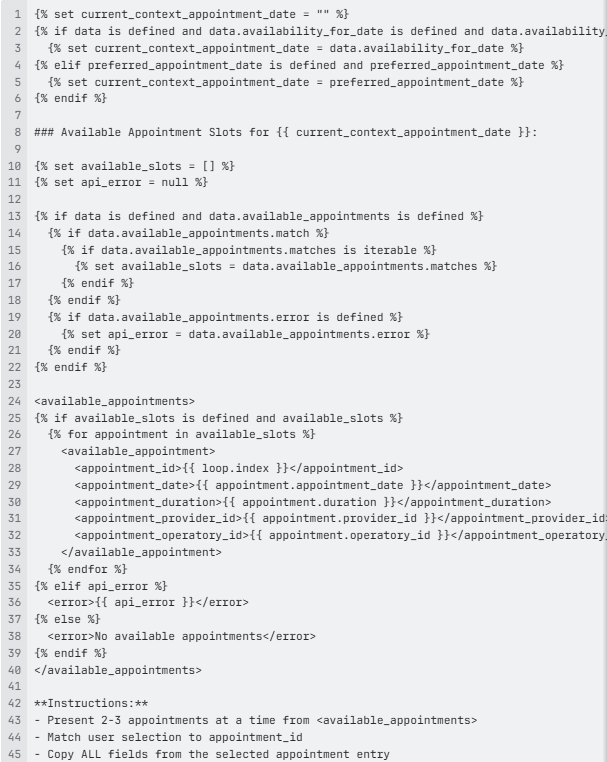
The example above:
-
Safely extracts availability data
-
Handles API errors gracefully
-
Creates structured output for AI parsing
-
Assigns sequential IDs for easy reference
Step Progress Tracking
Sample Step Progress Tracking
{% if payment_method is defined and payment_method == 'insurance' %}
## Insurance Information Collection

First, ask if they have their insurance info handy.
If they don't, skip to closeout step (Step ID: S259).

### (Step ID: S257): Collect Insurance Name
- Collect the insurance company name
- Validate against accepted insurances
- If not in list, inform them it's out-of-network
- If they don't have it available, proceed to Step S259

### (Step ID: S258): Collect Member ID and Group ID
- Collect member ID and group ID (optional)
- If they don't have their card, remind them to bring it to the office
- Proceed to Step S259

## (Step ID: S259) FINAL STEP - Closeout
- Inform: "Please wait while I add you to our system"
- Let them know this will just take a moment
- Thank them for providing the information

{% endif %}

#tool_call_instructions
**track_step_progress - Tracks current Step ID:**
In this example, the current_step_id depends on the run-time context:
-
When collecting insurance name, set to 'S257'
-
When collecting member/group ID, set to 'S258'
-
When in closeout, set to 'S259'
In this scenario, the template:
-
Labels each step with unique ID
-
Provides tool call instructions for tracking
-
Allows system to know exact conversation position
-
Enables step-based transitions
Handling Partial Information Collection
Sample Handling Partial Information Collection
 **ALWAYS call `collect_date_of_birth` tool after EVERY user response in this turn.**

**Handling Partial Information (ASR may cut off audio):**

{% if birth_month is defined and birth_month != '' and birth_day is not defined %}
**PARTIAL: Month only captured (e.g., "June")**
- "Perfect, I got {{ birth_month }}. And what's the day and year?"
{% endif %}

{% if birth_year is defined and birth_year != '' and birth_month is not defined %}
**PARTIAL: Year only captured (e.g., "1990")**
- "Got it, I got {{ birth_year }}. And the month and day?"
{% endif %}

{% if birth_month is defined and birth_day is defined and birth_year is not defined %}
**PARTIAL: Month and day captured, missing year**
- "Okay, I got {{ birth_month }} {{ birth_day }}. And what year?"
{% endif %}

**Voice-Friendly Response Rules:**
- Keep responses brief but warm (under 12 words)
- Acknowledge what you captured with positive words
- Sound friendly and conversational, not robotic

#tool_call_instructions
**collect_date_of_birth - MUST call after EVERY user response:**

birth_month:
- If user says month name (e.g., "June"), convert to "06"
- If unclear, leave as empty string ""

birth_day:
- If user says day (e.g., "15th"), extract as "15"
- If unclear, leave as empty string ""

birth_year:
- If user says year (e.g., "1985"), convert to "1985"
- If unclear, leave as empty string ""

date_of_birth:
- ONLY set when ALL THREE (month, day, year) are captured
- Format: YYYY-MM-DD (e.g., "1985-06-15")
- If incomplete, leave as empty string ""
In this example, the template:
-
Handles incremental data collection
-
Provides specific prompts for each partial state
-
Guides AI on voice-optimized responses
-
Clearly documents tool call requirements
Tips
-
Always use the confirm variable existence concept to confirm a variable exists before using.
-
Use defensive checks for nested data.
For example:
{% if data is defined and data.appointments is defined and data.appointments.matches is defined %} {% if data.appointments.matches|length > 0 %} Process appointments {% endif %} {% endif %} -
Provide clear fallbacks in your configurations.
For example:
{% if policy is defined and policy.personality is defined %} {{ policy.personality }} {% else %} Your name is {{ arg_brand_name }} Assistant. You are professional and helpful. {% endif %} -
Use namespace for complex state.
For example:
{% set ns = namespace(count=0, available_slots=[]) %}
{% for appointment in appointments %}
	{% if appointment.is_available %}
		{% set ns.count = ns.count + 1 %}
		{% set ns.available_slots = ns.available_slots + [appointment] %}
	{% endif %}
{% endfor %}
Found {{ ns.count }} available slots.
-
Make sure you validate your Jinja configurations to prevent errors.
-
Ensure you aren't looping over empty or null collections.
-
Confirm you're filters reflect the correct format (i.e., you're not treating strings as integers or vice versa).
-
Make sure extra white space isn't included in rendered output.
-
We recommend using whitespace control characters
For example:
{# Remove whitespace before #}
{%- if condition %}

{# Remove whitespace after #}
{% if condition -%}

{# Remove both #}
{%- if condition -%}
-
-
Ensure deeply nested data can be accessed safely.
-