AI Hub Agent Types
Overview
When you build an agent in the AI Hub, one of the most important questions to ask is, what kind of agent do you want to configure?
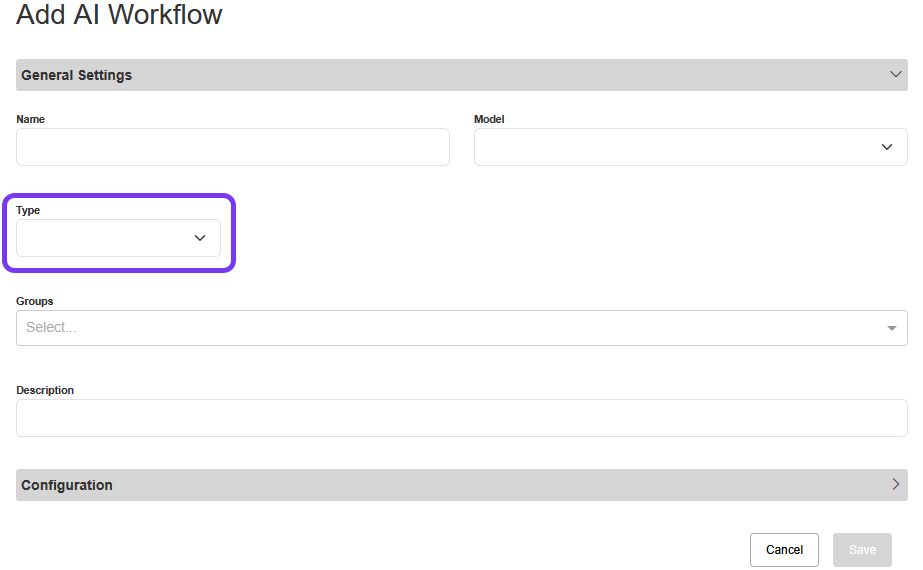
Certain agent types are more appropriate for different use cases (e.g., the Voicemail Detection Agent is tailor-made for that specific use). In general, we recommend using Agentic AI (aka Block Agent Type) for the most comprehensive experience.
Depending on which option you select, the mechanics of how your agent works (and crafts responses) will be different. For example, do you want your agent to have access to knowledge collection documentation? Or fire tools vs. provide structured output? As a result, the agent configurations are also slightly different depending on which agent Type you’re using.
Comparing AI Agent Types
The following agents are available to build in the AI Hub:
-
GPT Agent: An agent powered by prompting the Large Language Model (LLM).
-
GPT Agents do not have access to knowledge collection documents but can fire functions.
-
-
SAM Agent: An agent that has access to a knowledge base and can fire functions.
-
Agentic AI (aka Block Agent): An agent that makes two parallel LLM calls at each turn (one to trigger functions and the other to produce an AI response).
-
Ideal for most use cases.
-
-
Voicemail Detection Agent: An agent that detects whether outbound phone calls reach a live person or voicemail.
-
Built for a very specific use case, we don’t recommend trying to use this agent for anything else.
-
-
Analysis Agent: An agent which produces structured outputs of conversation metadata.
When to Use Each Agent Type
Most Common Use Case
There are always exceptions to every AI rule, but the following table should give you a good idea of what type of use cases most commonly match with each agent Type.
|
Agent Type |
Use Case |
|---|---|
|
GPT Agent |
The GPT Agent makes sense for most simple use cases, where your agent is leading a user through a routine task. For example, a GPT Agent could be configured to detect a caller’s intent in a “how may I help you?” scenario. |
|
SAM Agent |
Similar to a GPT Agent, the SAM Agent has the added benefit of access to knowledge base documentation. For example, a SAM Agent could be configured to help callers make dental appointments. Using the up-to-date knowledge base documentation, the agent can help the caller confirm what services the office provides, what insurance they accept, hours for an emergency appoint, etc. |
|
Agentic AI (aka Block Agent) |
We recommend using this type of agent for most use cases as it is the most comprehensive and reliable agent type. Block Agents allow you to design an entire conversational experience. For example, a block for intent detection, a block for scheduling an appointment, a block for bill payment, a block for insurance information, and a block to end the call. |
|
Voicemail Detection Agent |
Detects whether a live person or voicemail answers outbound phone calls. Note: This agent does not interact back and forth with a user. For example, if an appointment reminder call was being made, the agent experience can be tailored for a live person answering (e.g., “This is a reminder for your appointment… To confirm your availability, please say ‘confirmed’. To reschedule your appointment, please say ‘reschedule’…”) vs. voicemail (e.g., “This is a reminder for your appointment… Please give us a call back if you need to reschedule or cancel”). |
|
Analysis Agent |
Review call recordings post interaction to gather metadata and insights about each conversation and surface that information in SmartAnalytics. For example, an insurance company could analyze contact center calls to gather information about overall agent performance, the state callers were insured in, and caller satisfaction. |
Experience vs. Analysis
The agent types fall into two general categories: Experience or Analysis.
-
Experience agents facilitate conversations.
-
Analysis agents capture important metadata during or after a conversation.
For example, you would design an experience agent to guide callers through the process of scheduling an appointment. And you would design an analysis agent to review contact center call recordings after the interaction to gather insights about calls.
|
Experience Agents |
Analysis Agents |
|---|---|
|
GPT Agent |
Analysis Agent |
|
Sam Agent |
|
|
Agentic AI (aka Block Agent) |
|
|
Voicemail Detection Agent |
|
Agent Responses
Depending on which Agent Type you select, the mechanics of how it responds to a user message will vary.
Most agents receive a user message and decide what to do next depending on their configuration. For example, if a GPT Agent receives a “My name is Joe” user message, matching a “get_first_name” tool, that tool would be fired.
Some agents choose to only do one thing or another at each turn. For example, GPT Agents and SAM Agents receive a user message and must decide to produce a tool call or an AI response. While Agentic AI agents can do multiple things at each turn. They can produce an AI response and trigger a tool.
|
Agent Type |
How Does the Agent Respond? |
|---|---|
|
GPT Agent |
Produces a Tool Call or AI Response |
|
SAM Agent |
Produces a Tool Call or AI Response |
|
Agentic AI (aka Block Agent) |
Produces an AI Response at all turns and sometimes a wait token (pause where an External Web Call is included) Note: Tool Calls are involved with moving the conversation along within the block structure, but not in the same way as a GPT Agent or SAM Agent. |
|
Voicemail Detection Agent |
Produces structured output, never an AI Response |
|
Analysis Agent |
Produces structured output or a Tool Call (depending on your configuration), never an AI Response |