SAM Agent
SAM Agents are very similar to the GPT Agent, using OpenAI compatible Large Language Models (LLMs), with the addition of knowledge collection documentation to answer user messages.
Agent Methodology
This agent uses the Retrieval Augmented Generation (RAG) pattern to provide accurate responses to user messages. By combining the power of a LLM and RAG, SAM Agents have a “bigger brain”.
-
RAG takes the user message and queries a vector database to find semantically similar documents.
-
The database the RAG pattern queries is the knowledge collection documentation you add to the AI Hub via the Knowledge Collection page.
-
-
When a user message meets a semantically similar threshold of information in your documentation, that context is pulled out and gives the LLM greater context for the agent’s response.
-
For example, if a user asks about what insurance your office accepts, RAG enables the agent to find any matches in your knowledge collection documentation and uses that up-to-date information to accurately respond with the accepted insurance providers for this calendar year.
-
Channel Compatibility
The SAM Agent is channel agnostic (e.g., compatible for inbound or outbound voice, SMS, etc.).
Use Cases
Most commonly used for policies and procedures interactions. For example, to answer user questions about a medical office (e.g., when are you open/closed? What’s your location? What insurance do you accept? etc.).
Configurations
Knowledge Collections Page
Add documentation for the RAG pattern to query to a collection.
AI Workflows Page
When you build a SAM Agent, the following sections appear in the Configurations section and can be customized for your use case:
-
System Prompt
-
User Prompt
-
Tools
-
Knowledge
-
Parameters
Tips and Best Practices
-
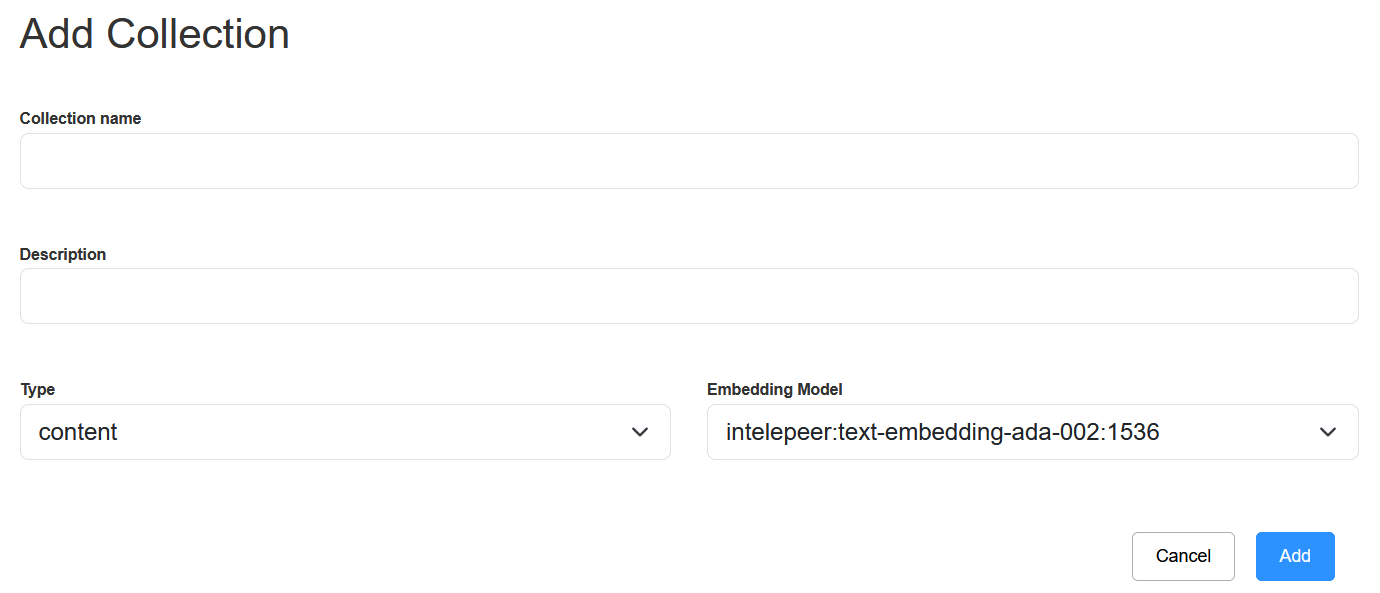
It's critical to select the correct Embedding Model when configuring your SAM agent.
-
A mismatch between the model you set up for your knowledge collection and the agent would lead to retrieval failures.
-
We recommend always using the “intelepeer: text-embedding-ada-002:1536” Embedding Model.
-
-
Knowledge Collection configurations:
-
We recommend always using the Type “content” and Embedding Model “intelepeer: text-embedding-ada-002:1536”.
-
-
When adding documentation to your knowledge collection, “chunking” (breaking your document up into pieces) is required.
-
Chunking documents ensure the information retrieval is more effective.
-
For example, the RAG pattern might have trouble finding a match in a 50 page as-is employee handbook document. But if you chunk the document into intuitive sections (insurance, HR contact information, harassment policy description, etc.), the process will be more accurate and run as expected.
-
-
To manually chunk your document insert <<!SECTION>> as a divider.
-
You can chunk between questions and answers or within a knowledge base document.
-
Questions and Answer example: <<!SECTION>> Q1, A1 <<!SECTION>> Q2, A2, etc.
-
Knowledge Base sections example: <<!SECTION>> Business Hours… <<!SECTION>> Accepted Insurance …, etc.
-
-
-
Chunk size depends on your use case and context.
-
A chunk should be large enough to fully answer a specific question (e.g., if you are including a question and answer, the whole answer should be in one chunk (do not split it in half between two chunks)). Balance fully addressing an answer while not providing multiple pages of content in one chunk.
-
-
-
Once you create your Knowledge Collection and add documentation to, we recommend testing it out.
-
Click the pencil icon on the far right of your Knowledge Collection to open the Edit Collection pop-up.
-
Here you can experiment with changing the threshold and amount of results, and test out queries to ensure the expected results are found.
-
You can always update or rechunk your documentation as needed to refine the agent’s performance.
-
Check out this page for information about building a SAM Agent.