How to Use Special Instructions
This guide describes when and how to configure AI agent Special Instructions. Learn more about:
Overview
When you’re designing an AI agent, you can include Special Instructions to reinforce concepts that are critical to your agent’s performance.
For example, when building a Weather Forecast Assistant, you might give your GPT_Agent Special Instructions to keep responses brief and free from complex jargon (e.g., limit your responses to 75 character or less and avoid advanced atmospheric terms).
Special Instructions Design
In the agent conversation chain, Special Instructions are added right before the user message. The Special Instructions are applied to the most recent user message (diagramed in the image below), and while the conversation progresses, your instructions aren’t attached to the prior messages.
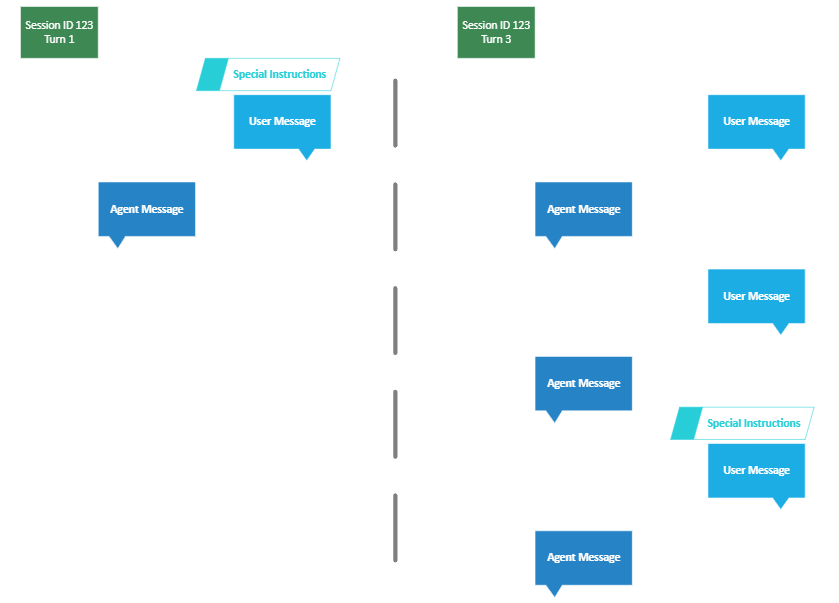
Acting as a sort of “assistant message” Special Instructions are more heavily weighted when the LLM is determining the agent’s response. The goal is for Special Instructions to reinforce important business or logic rules, response constraints, or response formatting for your agent. This ensures consistency and accuracy in the agent’s responses.
Testing and Special Instructions
When using the testing framework on the AI Hub Tasks page, you do not need to include your Special Instructions in the testing input file. The test framework automatically takes your agent’s Special Instructions into account, and you do not need to add anything to the file to ensure the instructions are included in your test cases.
Recommendations
-
Adding too much content to the Special Instructions section could create a negative outcome.
-
We recommend keeping Special Instructions content as brief as possible (i.e., just one sentence, where possible) and limiting the number of instructions.
-
-
As your use case refines and grows over time, you may see more and more content being added to the Special Instructions section.
-
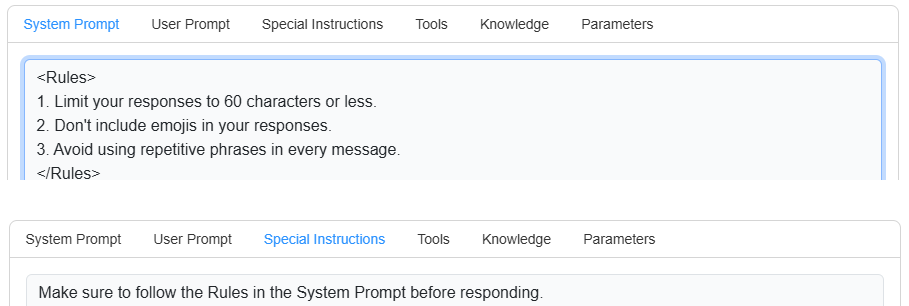
For an alternative solution, we recommend including a “Rules” section (in an XML tag) in your System Prompt and listing out the important instructions there, rather than in the Special Instructions. The, in the Special Instructions section, you can add one sentence referencing the “Rules” XML tag in the System Prompt.
-
For example:
-