AI Hub Best Practices
This guide describes recommendations and best practices for building and managing agents within the AI Hub. Learn more about:
Configuring an Agent
-
We recommend using the “intelepeer:gpt-4o-mini-intelepeer” Model for the majority of use cases.
-
Make sure you are selecting the appropriate Type of agent.
-
The FAQ_AGENT doesn’t support functions.
-
The GPT_AGENT doesn't use knowledge collections.
-
The SAM_AGENT can use either a function or knowledge collection (but not both at the same time in one turn).
-
The BLOCK_AGENT uses a graph data structure with standardized prompting for more complicated agents.
-
The VM_DETECTION_AGENT only determines if a live person or voicemail answers outbound calls.
-
-
Double check the Configuration section to ensure there are no spelling or formatting errors that might cause your agent to perform unexpectedly or not function at all.
Prompt Writing
-
Make sure your System Prompt is clear and specific.
-
Agent instructions can include the purpose, specific instructions, examples, and other guidelines for how the agent should behave. This will vary widely depending on your specific use case.
-
Refine, refine, refine! We recommend continually testing your agent and reviewing your metrics. Then you can add, update, or delete from your prompt to ensure it continues to work as optimally given changes to your requirements (e.g., you could have new products released that your agent needs to understand, or notice popular trends that your agent could inquire about earlier in an interaction).
-
-
In most cases, we recommend using Markdown language to format your prompt:
-
Hashtags represent headings to section your prompt (# is Heading 1, ## is Heading 2, etc.) and can be used for nested topics (e.g., #Personality).
-
Delimiters (e.g., lots of dashes or hashtags on their own line), dash and space for a bulleted list, digit and space for a numerical list, double stars for bold text can be used throughout your prompt as needed.
-
Avoid using arrows or emojis in your prompt (unless your building a messaging agent and the customer has specifically asked to include emojis in their messages).
-
-
While we recommend focusing most of your prompt on what it should be doing, you can also include a brief description of what your agent should not do in the prompt (e.g., 95% positive and 5% negative).
-
It's very important to protect against abusive or inappropriate behavior and generally we want to ensure the agent is staying within specific boundaries (e.g., a weather forecasting agent should not be opining on politics or giving advice about a medical emergency).
-
For more general guidance about prompt engineering, check out this page.
Tools and Functions
-
When using a function for intent identification (how may I help you) you have two options:
-
Create separate functions for each possible intent
-
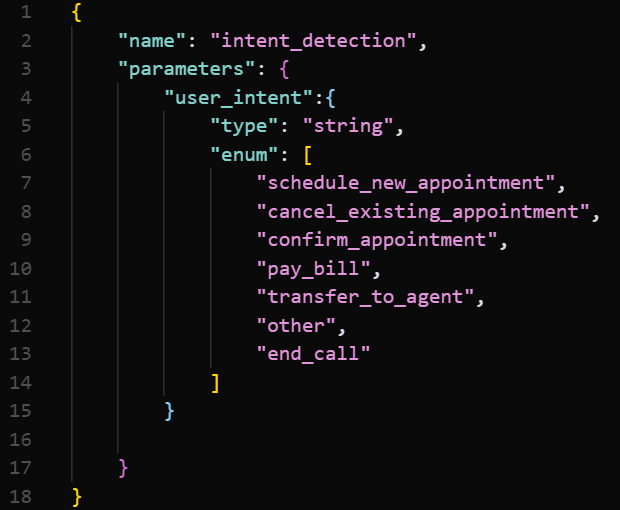
Create one function that tells the LLM to identify and select the intent from an enumerated list of intents (generally, this is our recommended approach)
-
-
For example, for a medical use case we could include separate functions for scheduling an appointment, canceling an appointment, confirming an appointment, paying a bill, talking to a live agent, etc. But we recommend using one function, enumerating these options (example below).
-
Be extremely clear in the function description. This heavily impacts which function the LLM chooses.
-
Add "When to use this function" and "When NOT to use this function" notes in each description.
-
Include example phrases in the description (e.g., "If user says 'I want to book a new appointment', choose this.").
-
Use system messages to guide behavior (e.g., “You are an intent classifier. Only choose the ‘intent_detection’ function if you are confident”).
-
You can also include an “other” option to catch outlier intents.
Testing an Agent
-
Task Type “Agent Multiturn Eval” is recommended for the most use cases. Only use “Agent Utterance Eval” if you are measuring how the language model responds to one single input with no follow-up interaction.
-
Include at least 100 records in your testing input file. The more possible test cases you include the better to evaluate the performance of your agent.