Managing Users in the Customer Portal
This guide describes user management features found in the Customer Portal.
Note: You need Administrator permissions to manage other users for your account.
The User Management page is where you can:
-
Manage your account’s existing users, including editing user and contact details, disable users, and reset passwords
-
Create new users
-
Create and assign roles
-
Create optional password profiles
Note: Only one password profile can be assigned at a time. Selecting a new profile unassigns a previously assigned profile.
To manage your account users:
-
Log into the Customer Portal.
-
From the Manage Enterprise menu at the top of the page select Enterprise User Management to open the User Management page. The page displays the following tabs: Users, Roles, and Password Profiles.
 Viewing, Editing, and Creating Users
To view all existing users associated with your company, on the User Management page, click the User tab. The table provides you with the following information:
-
Name
-
Phone number
-
Email address
-
Username
-
Access -- for example, Portal or API
-
Contact -- actions triggering a notification to this user; this is optional
-
Roles assigned to this user
Editing a User
If you want to make changes to a user, in the user row on the right side of the table, select one of the options from the menu:
-
User: Edit
-
User: Disable
-
User: Reset Password
After you select your option, click GO for that user.
For the User: Edit option:
-
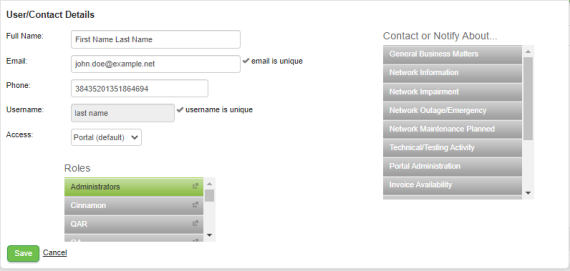
When you click GO, the User/Contact Details window appears.
-
Make any changes to the user details.
-
To make change to the Roles or Contact or Notify About element, click to highlight a tile to enable it, or click a highlighted element to disable it.
-
Once you completed your changes, click Save. You return to the user table where the changes to the user are now displayed.
For the User: Disable option:
-
When you click GO, the Disable User pop-up informs you that once you click OK, the user won't be able to log in unless re-enabled.
Note: The user is not removed from the user list.
-
Click OK to disable the account or click Cancel to return to the user table without disabling the account.
For the User: Reset Password option:
-
When you click GO, the Reset User Password pop-up informs you that once you click OK a random password is created and is emailed to the user. The previous password no longer is valid.
-
Click OK to disable the previous user password and send a new password to the user's email address.
Creating a User
-
At the top right, click Create New/User Contact. A blank User/Contact Details window appears.
-
Include the full name, email address, and phone number for the new user.
Note: The email address must be unique compared to all other user emails.
-
Click Create Login. The Username, Access, and Roles fields appear.
-
Click to highlight the role tiles to assign any roles to the user.
-
You can also click to highlight any of the Contact or Notify About tiles for the user.
-
Once you finish entering the information, click Save. The user table is displayed with the new user added. An email is sent to the user that includes their username and password information.
Creating Roles
A role provides you with a way of focusing user access in specific ways for your account's Customer Portal environment. It is a pre-defined set of permissions assigned to users (for example, Administrator). If permissions for a role are changed, all users assigned to that role are affected.
Roles are made up of the following elements:
-
Role name
-
Users assigned to the role
-
Services assigned to the role, along with access type -- Create, Read, Update, and Delete
-
Packages / accounts accessible with this role; this is also known as the billing segments
To view the roles currently active for your account, on the User Management page, click the Roles tab. The table shows the role name, and users, services, and billing segments (packages) associated with the role.
Note: Mouse-over the icon to the left of an entry in the Users, Services, or Billing Segments columns to view a list of the elements associated with that heading. For example, performing a mouse-over the icon in the Users column displays all the users currently assigned to that role.
To create a new role:
-
On the Roles tab, click Create New Role. A blank window appears with the following tabs: Role Information, Users, Services, and Packages.
-
On the Role Information tab, type a unique name for the role.
-
On the Users tab, use the Add a User menu to identify and add users who will be assigned to this role. Click Add to Role for each user. The user appears in the list on the tab.
Note: To remove a user from the role, click the x to the left of the user's name.
-
On the Services tab:
-
Use the Add a Service menu to choose those services (for example, API Access or SmartFlows) associated with the role, and click Add to Role to include the service to the list. Click the x to the left of the service name to remove the service from the role.
-
Select or clear the Access Type check boxes to specify if you want the role to include create, update, and delete permissions.
-
In the Platform column, you can view those roles that have Portal or SmartFlows services assigned to them. As will other services, you can add or remove any Portal services and add or remove SmartFlows services for any role.
-
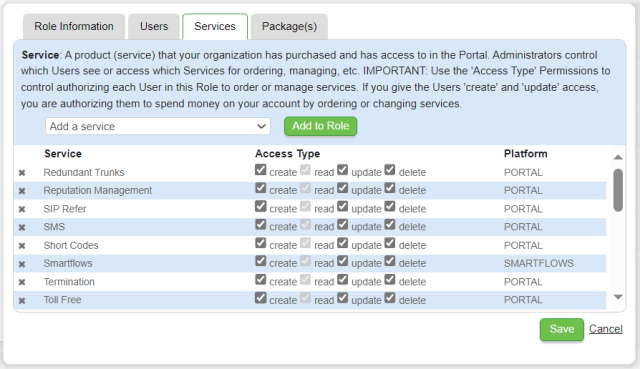
Note: Read access is the default option and its check box can't be cleared. If the Read check box is the only one selected, the user role has read-only permissions.
-
On the Packages tab, use the Add Account menu to choose those services / packages to be included in the role. In this way, you can limit a role to specific packages and exclude the users from others.
-
Click the x to the left of the name to remove a package from the role.
-
Once you complete adding the elements to the role, click Save. The role now appears in the role table.